
1. How do I sign-up for the study and what is the process for getting started?
You can sign-up to take part in our study by completing the sign-up form: https://elm-group.org/participate/
Please be aware that signing up for the study is simply an expression of interest, not a commitment to continuing in the study.
After submitting this form, you will receive an automatic email. If you are eligible for the study, the email will tell you about the next steps.
If you select the email/web version of the study, you will receive an automated email from: noreply@qemailserver.com
It will provide a link for the first part of the study. Before you answer any questions or give any further information, you will read through the Participant Information Sheet and Consent Form. If you decide to take part in the study after reading these, the first task will begin. If you decide not to consent, the study will not begin.
If you select the Expiwell app version of the study, you will receive an automated email from: noreply@qemailserver.com
It will provide links to instructions on how to download the app, create an account in Expiwell, and how to put in the access code for our particular study. Before you complete the first study task, the Participant Information Sheet and Consent Form will be presented within the app. If you decide to take part in the study after reading these, the first task will begin. If you decide not to consent, the study will not begin, and you could delete the app.
2. I accidentally missed a part of the study. What happens now? Can I continue?
That’s ok, these things happen! The only parts that you can’t skip are the health and wellbeing surveys at the start of each 6-month block. This is because of logistical reasons as much as anything else – if you skip these the system doesn’t know that you exist, so you won’t get access to the rest of the tasks.
After the health and wellbeing survey is done at the start of a 6-month block, it is fine if you miss one or two tasks. If you stay at 80% or more completion, you will still be able to receive your thank you gift for the current 6-month block of the study. This applies no matter which method you are using the complete the study, app or website.
If you miss a section of the study or a task within the app, it will have a red box next to it which says Missed. Just wait until you are notified about the next task to continue in the study.
If you are completing the study on the Qualtrics website and you miss a task, the URL in that email will no longer work. Just wait until you get your next email reminder, and then you will be able to continue in the study.
3. I need/want to withdraw from the study, what do I do?
We are sorry to see you go. Every contribution you have made to the study is valuable and important, and we really appreciate the time and effort that you have put in.
To officially withdraw, you can fill out the following form. If possible, it would be great for us if you can take a minute to let us know that you want to withdraw and the reason why. It is important for us to be able to accurately report this in scientific publications. It will also ensure that we make future studies better for all our participants.
You can stop participating in the study at any time, and you do not have to fill out this form if you don’t want to. Anyone can stop taking part in the study at any time, for any reason.
To stop reminders on the email and website version of the study:
In this version, all reminders are programmed and scheduled from completion of day two of the study and we cannot turn this off. However, you could block the study reminder email address. That way you won’t see them in your regular email inbox as they would get automatically shifted to spam and then deleted after 30 days.
The reminder email address is: noreply@qemailserver.com
This is the address to block if you want to avoid see the reminder emails.
- See this guide on how to block email addresses in Gmail
- See this guide on how to block email addresses in Outlook/Hotmail
- See this guide on how to block email addresses in iCloud
- Here is how to block senders in Xtra email:
- Sign in to Xtra Webmail.
- Click the Settings (gear icon) in the top right.
- Select Email from the left-hand menu.
- Choose Blacklists.
- Add the specific email addresses or domains you wish to block.
To stop reminders on the ExpiWell version of the study:
- Open the ExpiWell app on your phone
- Tap the three dots to the right of the study, then choose “remove experience”
- You can then remove the app from your phone
4. I am doing the study, but I’m not sure which email link to follow or what notification to press. I have a few emails together in my inbox.
No worries, we recommend just opening the latest one and continuing from there.
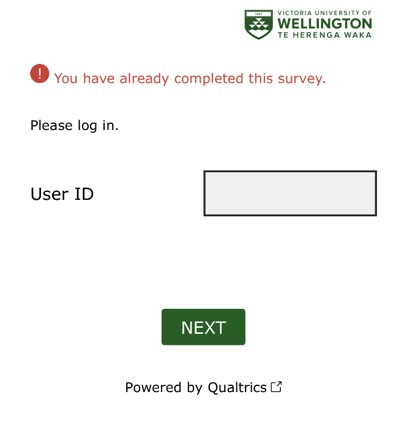
If you do click on a link or notification that leads to a study you have already done, that’s ok. Nothing will happen, the system will let you know that you’ve already completed the task and you can’t do it again.
You will see a screen that looks like this:
5. I was in the middle of a survey/task but I had to close it and go do something else. Can I keep going with the task now? Can I still complete it?
Yes! If you close any part of the study before pressing submit, you can go back and complete it before the 24-hour period for that task has ended. You may have to restart that task from the beginning though, as responses only get stored when you press submit, and are never stored before that point.
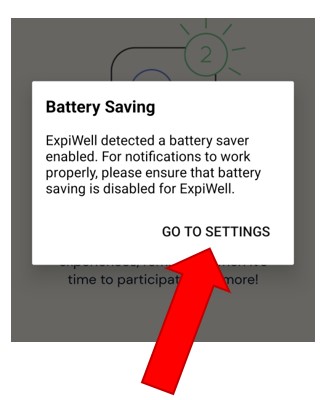
6. When I was downloading the app, it said something about battery savings. Why did it do this and what does it mean? Will the app drain my battery?
This is normal, and it usually happens on Android (Samsung, Oppo etc.) phones. It is just a message to let you know that the Expiwell app will be active every now and again to let you know when a new task is ready to complete for the study. If you press ‘GO TO SETTINGS’ on that pop-up notification, you don’t have to change any settings, it will just go away and shouldn’t pop up again. The Expiwell app will not have a significant impact on your battery and will not make a difference to the battery life compared to using any other app.
7. The app homescreen says something about “experiences.” What are they? I am looking for a study or a survey.
Yes, this can be a bit confusing! The app always calls all task, surveys, questionnaires, or parts of a study “experiences”. Unfortunately, we can’t change this. Do be reassured, that whenever it says “experiences” it means tasks or parts of the study.
8. I am ready to do another part of the study, do I have to put the code in again?
No, you only have to put the code in once. It is a like a password that unlocks all parts of our study for you. Once you have entered the code and begun the study, you never have to out the code in again.
9. I am ready to do another part of the study and I got a notification. What do I do now?
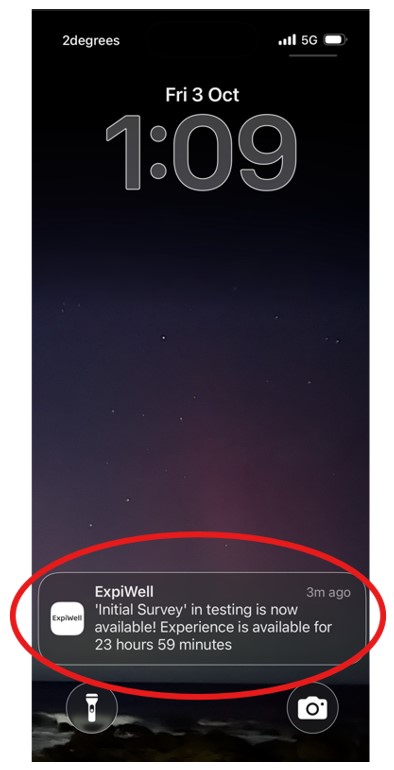
If you can see the notification on your phone, you can press the notification and it will take you to the next part of the study. A notification on the lock screen of your phone will look similar to this:
10. I am ready to do another part of the study, but I cleared the notification and can’t see it on my lock screen anymore, now what?
That’s ok! The notifications are just reminders; you can still go into the app and complete that part of the study.
Open the Expiwell app. If a part of the study (a task or “experience”) is ready for you to do, there will be a white, rectangle box. Press the box.
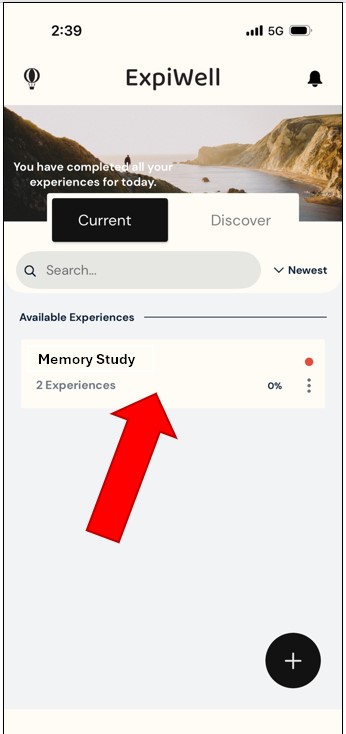
This will take you to another page, which looks similar, and has another white rectangle. If a task for the study is available to be completed, this page will have a little green box that says “available” within the white rectangle. Press this little green box.
(Please Note: If the little box is red and says “missed” you have missed the timeframe for completing this part of the survey. You will usually be ok to continue taking part.
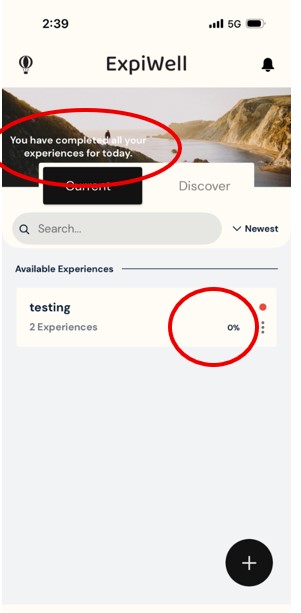
11. When I open the ExpiWell app, it says that I have completed all of my tasks (“experiences”) for today, but I got a notification about a new task that I know I haven’t done yet. It also seems like the total percentage of task/experience completion is not correct and I don’t want to miss out on the thank you gift for completing 80% or more.
You are correct, there could well be some errors in the white text on the app home page and/or in the percentage completed that is displayed on the home page. We have raised this with the ExpiWell team, and we are hoping they will be able to create an update to correct this. You haven’t done anything wrong – this is a mistake in the app, and we can’t fix that ourselves, unfortunately. The below picture has circles around the two pieces of information that may be incorrect on the app home page – the text and the percentage.
Please rest assured that the research team will check participation rates ourselves when we are assessing who is eligible to get the thank you gift at the end of each wave of the study. We will not rely on the completion percentage displayed in the app to determine who has done 80% or more of the tasks and thus is eligible for the gift.
12. The app says something about updating. Should I trust this and what do I do?
No worries! Sometimes the Expiwell company makes changes to the app to fix bugs or to add in new features. This is fine and will not affect anything relating to your participation in the study. It is best to update the app and then complete your task/survey/part of the study.
If you have an Android phone (Samsung, Oppo etc.) and a notification asking you to update appears, press the word “update.” You will be asked to choose either the Play Store (all Android phones) or the Galaxy Store (Samsung only), then press update. You can then press open when the update is complete to return to the updated version of the app.
If you have an Apple phone (an iPhone) and a notification asking you to update appears, press the word “update.” This will take you to the App Store. Press update. You can then press open when the update is complete to return to the updated version of the app.
13. I can’t get into the app – it keeps closing each time I try to open it to complete a task. What should I do now?
Technology can be frustrating at times! Click Here for a variety of solutions that should sort out any issue with the ExpiWell app. The methods will be different depending on whether you have an Android or Apple phone, so just disregard whichever is not relevant for you. Information specific to the ExpiWell app is also provided below, and this applies no matter what type of phone you have.
14. I am using the ExpiWell app but do not like it. Can I switch to the email and website version of the study?
For data safety and security reasons we cannot take a person’s data and put it into the other version of the study. This means if you start the study on the app but find it a bit troublesome, we are unable to send your data to the website version. If you wanted to continue with the study, you would have to keep using the app or start again from day 1 in the web version. It is up to you what you decide to do if you are finding the app too hard. Remember, you can stop taking part in the study at any time, for any reason. There is never any pressure to continue if you don’t want to.
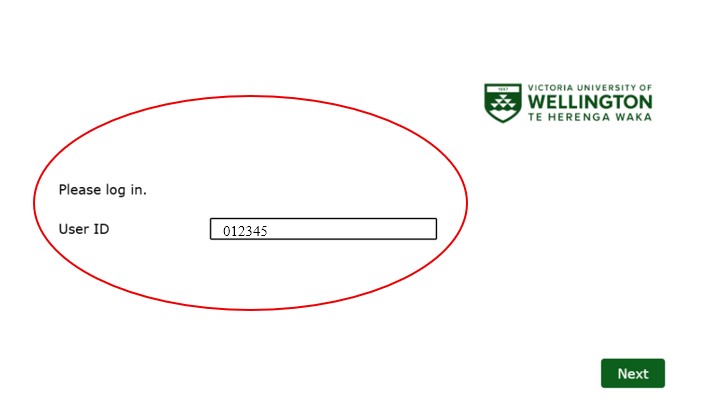
15. I am completing email and website version of the study, and now the website is asking me to log in with an ID number, but I don’t have one. What do I do now?
Sorry that you are experiencing this issue, the ID is supposed to self-populate and you should not have to do anything.
At the end of the web link (the URL) in the reminder email, there is a user code. If the study website (Qualtrics) asks for a user ID, then you can type these numbers into the box called User ID.
Example:
If the link in your reminder email looked like this:
https://vuw.qualtrics.com/study/SV3XdKuabcdu7p5Q?uid=012345
The ID number that you would type into the User ID box is shown after “uid=” on the link itself. This is the six digit number that you would enter on the Qualtrics website (In the example above it would be 012345). Then click the next button to continue with the study
16. I have another issue or question that has not been answered on this page. What should I do?
Please feel free to contact the research team at any time about questions or concerns that you may have.
You can fill out the form on this page
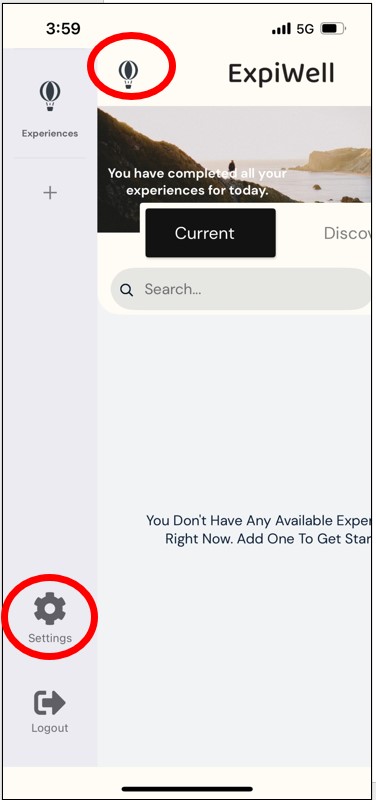
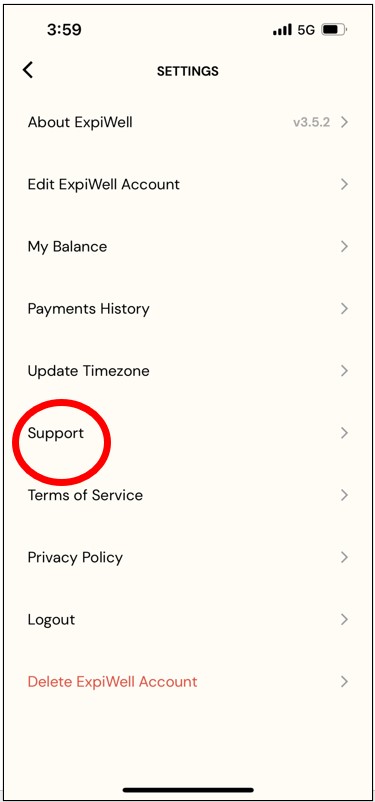
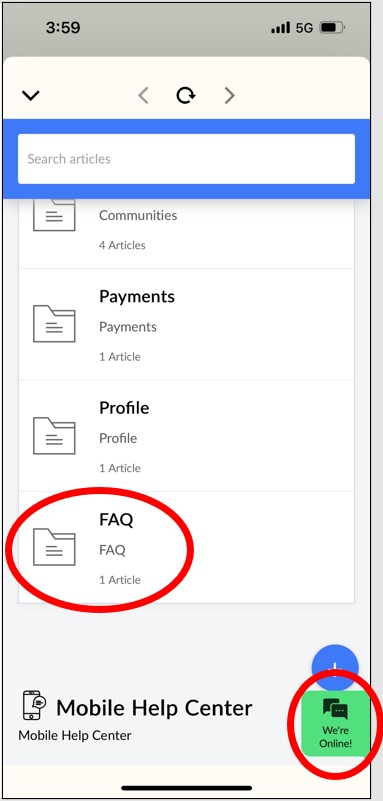
In addition, there is some help information within the app that you might find useful. If you are able to log into the app, there is a help centre if you press the balloon icon. This will open up the menu from the left side.
 ELM Home